In short: On the Tables tab, click Upload table and choose a CSV or XLSX file of up to 20 MB. Voizee reads the columns; you choose up to 20 Searchable columns and click Confirm and train. Your AI agents can then find the rows that match a question — a service and its price, a product, a zip code.
What it is
A table is a spreadsheet in the knowledge base: each row is one item, such as a service, a product, a vehicle, a location or a zip code. When a customer asks about a specific item, the AI finds the matching rows and answers from them.
Why use tables
- Large lists without retyping. Load a price list or an inventory export as it is.
- Precise facts per item — price, size, availability, coverage area.
- Easy updates. Upload a new version of the file with Replace file.
Before you start
- Create a knowledge base — see Create a Knowledge Base.
- You need to be an account admin or a call manager.
- Prepare the file:
- CSV or XLSX, up to 20 MB;
- the first row holds the column names;
- one item per row, one kind of value per column;
- in a workbook, put the data on the first sheet — other sheets are not used.
Upload a table
- Open AI & Automation → Knowledge Base, click a knowledge base and open the Tables tab.
- Click Upload table and choose the file.
- Wait while Voizee shows “Checking the file…”. When it is done, you see the number of rows, the columns and the First rows of the table. The table’s status is Awaiting schema.
- For each column, check the Type — Text, Number, Date or Yes/no — and change it if Voizee guessed wrong.
- Tick Searchable for the columns the AI should search — between 1 and 20. The first 20 columns are ticked for you.
- Click Confirm and train.
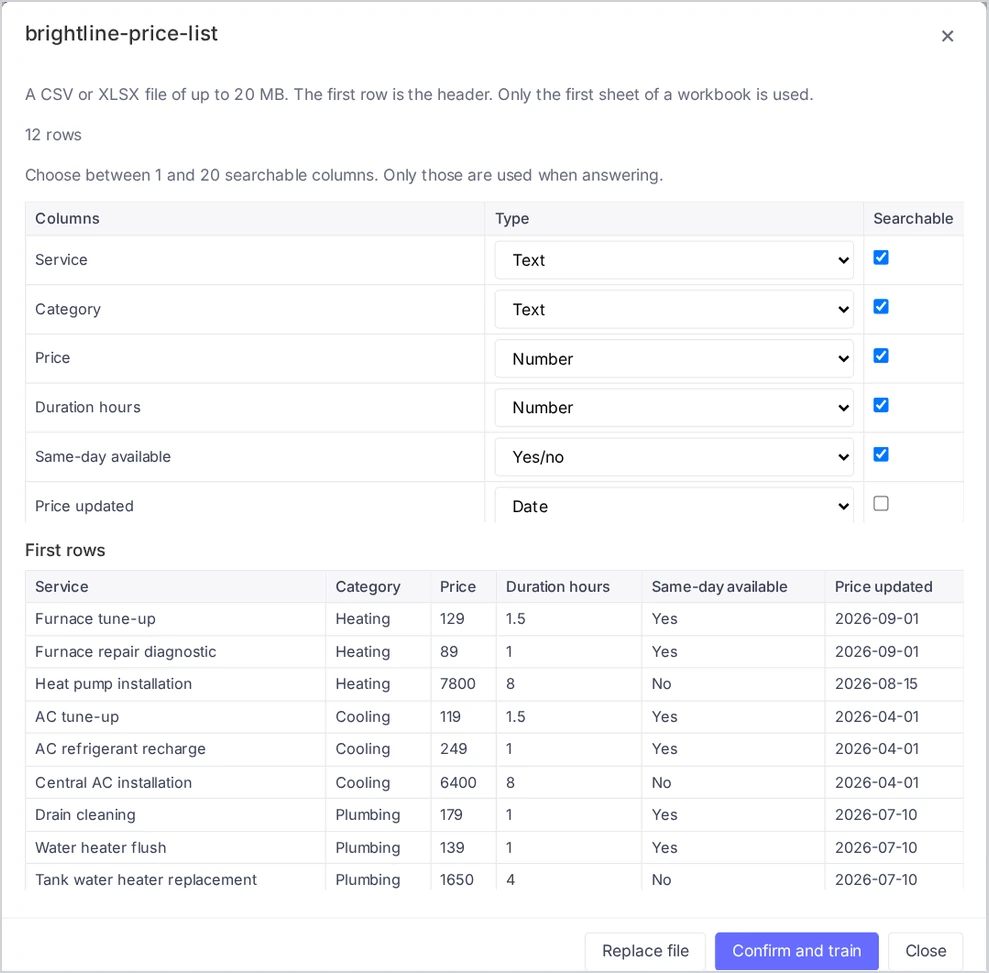
If some values do not match their column’s type, Voizee says how many and keeps them as text.
Which columns should be searchable?
Only searchable columns are used when answering. Tick the columns that hold what customers ask about and what they need to hear back.
| Table | Searchable columns |
|---|---|
| Service price list | Service, Description, Price, Duration |
| Vehicle inventory | Make, Model, Year, Trim, Price, Mileage, Stock status |
| Service area | Zip code, City, Service days, Travel fee |
| Product catalog | Product name, Category, Size, Price, Availability |
Leave out internal columns such as cost, supplier, margin or internal IDs. They are not needed for answers.
What table search can and cannot do
Table search finds rows by meaning and by the words in them. “How much is a brake job?” finds the row with “Brake pad replacement”.
It does not filter, sort or calculate across the table. Questions like “What is your cheapest service?”, “How many SUVs do you have?” or “Total for three rooms” do not get a reliable answer from a table. For those, add an FAQ with the answer, for example “Our lowest price is …”.
Work with tables
- Open a table: click it in the list. A trained table shows its rows, 100 per page, with Previous and Next.
- Download CSV: download a trained table as a CSV file.
- Replace file: upload a new version of the file. Voizee checks it, and you confirm the columns again.
- Delete: tick tables and click Delete selected.
Tips & best practices
- Use clear column names. “Price (USD)” is better than “P1”. The AI sees the column names next to the values.
- One item per row. Don’t merge cells or put several products in one row.
- Write values customers understand. “In stock” beats “1”; “Mon–Fri” beats “WD”.
- Keep prices current. When prices change, update the spreadsheet and use Replace file on the same day.
- Check with the Test tab. Ask about two or three specific items. See Test What Your AI Agents Will Answer.
FAQ
Which file formats can I upload? CSV and XLSX, up to 20 MB. In an XLSX workbook, only the first sheet is used.
Why is my table “Awaiting schema”? Voizee is waiting for you to confirm the columns. Open the table, choose the searchable columns and click Confirm and train.
Can I make more than 20 columns searchable? No. Choose the 20 that matter most for customer questions.
Why did Voizee say “N more rows can be added”? The table has more rows than your account has room for. Remove rows you don’t need — old items, discontinued products — or split the content.
Can the AI tell a customer the cheapest or the newest item? Not reliably from a table, because table search does not sort or calculate. Add that answer as an FAQ.
Related articles
- Add FAQs and Import Them from a CSV File
- Upload Files to the Knowledge Base
- Test What Your AI Agents Will Answer
- Knowledge Base Limits and Supported Files
Still feeling stuck? Please send us your questions using this form.