In short: The Ring users block rings a group of numbers so any available teammate can answer. Set how long it rings, and choose what happens on If number busy or If no answer.
What it is
Ring users sends the caller to a phone number group — a team — instead of a single line. Everyone in the group is rung so the first available person picks up. You set a dial timeout, and the block branches on If number busy and If no answer just like a single forward, so unanswered calls always have a next step.
Why use it
- Get calls answered faster by ringing the whole team at once.
- No single point of failure — if one person is away, others can pick up.
- Fall back cleanly to voicemail or another block when nobody answers.
Before you start
- Have a phone number group ready (or create one with the + next to the field).
- Decide the fallback for busy and no answer.
- New to branches? See Connecting & Branching Calls.
Set it up
- Click the + on a connection and choose Ring users.
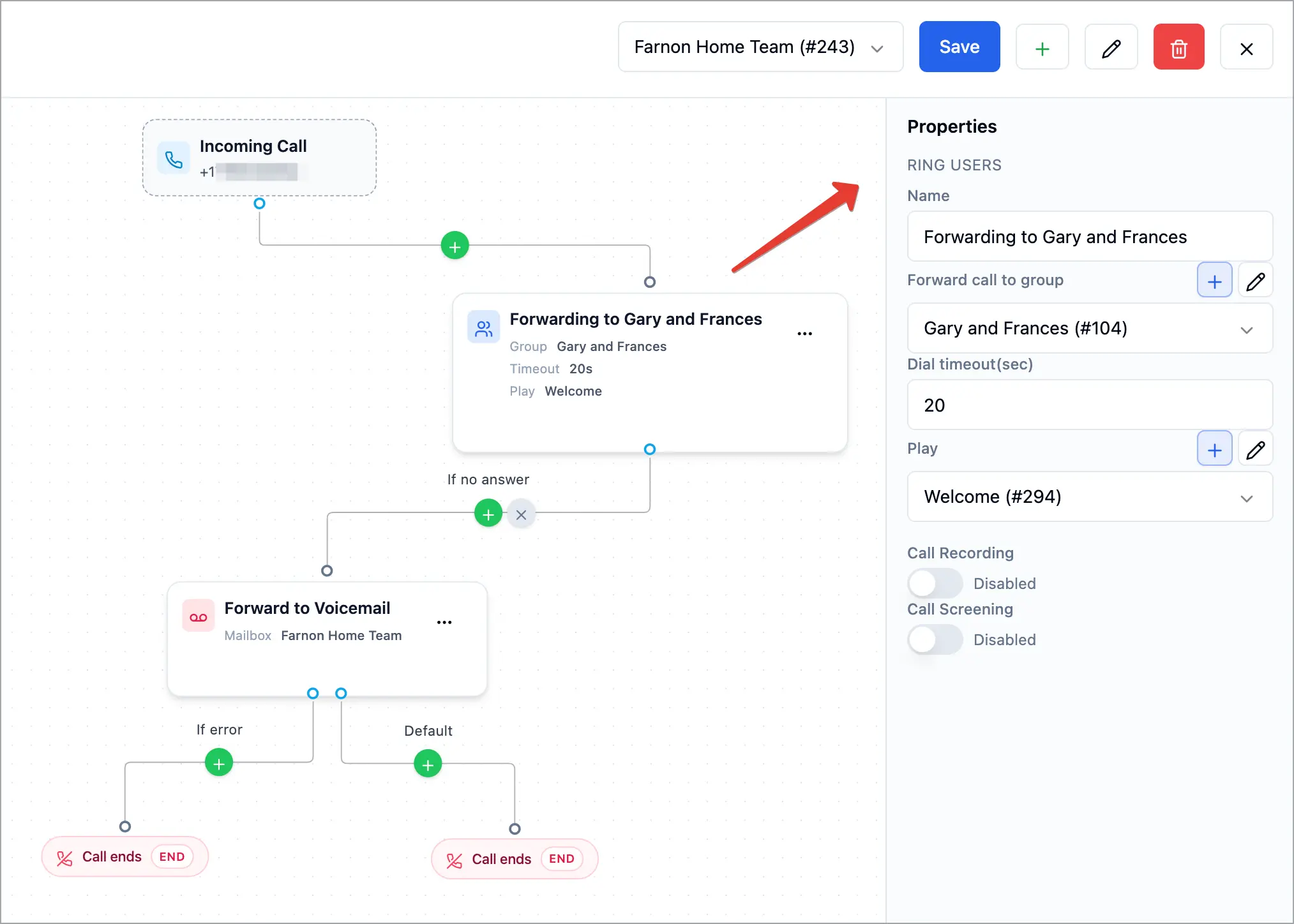
- Click the block to open Properties.
- In Forward call to group, pick the group to ring (or click + to add one).
- Set Dial timeout(sec) — how long the group rings before the call moves on (default is 20 seconds).
- (Optional) Choose a greeting in Play, turn on Call Recording, and turn on Call Screening to add a Whisper for whoever answers.
- Connect If number busy and If no answer to the next block (usually a Voicemail), or disconnect them to end the call.
- Click Save.
How it works
The call rings the group for up to the Dial timeout(sec) you set. The first person to answer takes the call (hearing the whisper first, if you set one). If everyone is busy the call follows If number busy; if nobody answers before the timeout it follows If no answer. Disconnected outputs end the call.
Tips & best practices
- Keep the dial timeout reasonable — long enough to answer, short enough that callers aren’t left ringing (20–30 seconds is common).
- Send no-answer to voicemail so busy periods don’t lose leads.
- Use call screening so teammates know which line the call is for.
FAQ
How is this different from Forward call?
Ring users rings a whole group; Forward call rings one number. Use Ring users for a team, Forward call for a single line.
Who picks up when the group rings?
The first available person in the group. The others stop ringing once someone answers.
What if no one answers?
The call follows If no answer — send it to a Voicemail block or another destination.
Related articles
Still feeling stuck? Please send us your questions using this form.