In short: The Play audio block plays a recorded message to the caller — a welcome, an announcement, or hold instructions — and then sends the call on to the next block.
What it is
Play audio is the simplest block: it plays one greeting to the caller and continues. Use it to welcome callers, read out an announcement, or set expectations before a menu or a transfer. It has a single output — Default — that leads to whatever comes next.
Why use it
- Set the tone with a branded welcome before anything else happens.
- Announce hours, promotions, or changes without involving your team.
- Prepare callers for a menu or a transfer so the next step feels natural.
Before you start
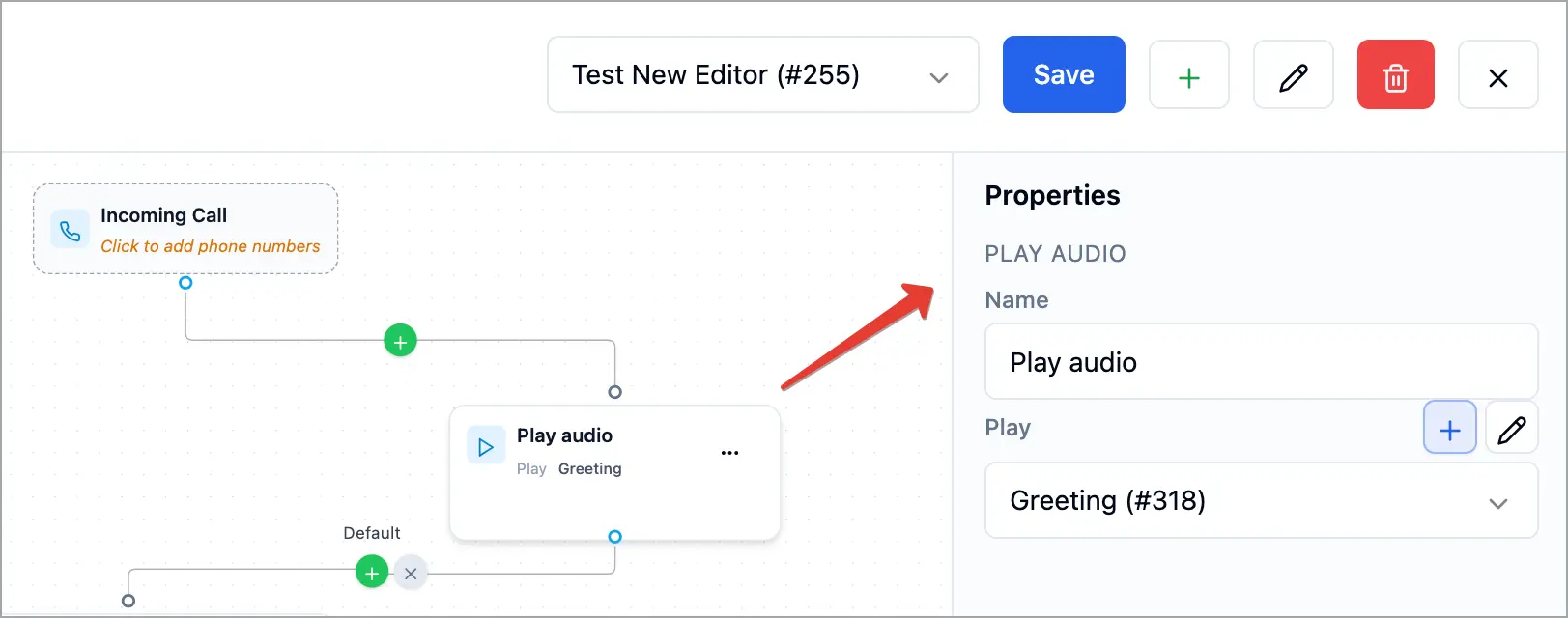
- Have your greeting recorded or uploaded. You can also create one on the spot with the + button next to the Play field.
- Know where in the flow the greeting belongs — see Connecting & Branching Calls.
Set it up
- In the Call Flow Editor, click the + on a connection and choose Play audio.
- Click the new block to open Properties.
- In Play, select the greeting to play (or click + to add a new one).
- Connect the block’s Default output to the next block, or disconnect it to end the call after the message.
- Click Save.
How it works
When the call reaches this block, Voizee plays the selected greeting to the caller from start to finish, then follows the Default output to the next block. If Default isn’t connected, the call ends after the message.
Tips & best practices
- Keep it short. A few seconds is enough for a welcome.
- Record clearly and avoid background noise.
- Put it before a menu to introduce the options that follow.
FAQ
Can I record a greeting without leaving the editor?
Yes — click the + next to the Play field to add a new greeting.
What happens after the greeting?
The call follows the Default output. Connect it to the next block, or leave it disconnected to end the call after the message.
Related articles
Still feeling stuck? Please send us your questions using this form.