Voizee now includes a built-in link shortener available directly in the message panel. This feature helps you make your messages look more professional, reduce character count, and optimize your SMS campaigns — all at no additional cost.
What It Does
When composing a message in Voizee, you can shorten long URLs directly from the message editor. This creates a clean, compact link that fits neatly in your text message and helps save on SMS credits.
How to Use It
-
Enter or paste your long URL into the message field.
-
Highlight or select the URL.
-
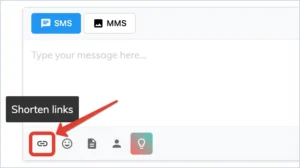
Click the chain icon in the message toolbar.
-
Your long URL will be automatically shortened and inserted into the message.
Benefits of Using the Voizee Link Shortener
Using Voizee’s built-in shortener provides several key advantages:
-
Makes messages look professional – Shorter, cleaner links are easier for recipients to trust and read.
-
Saves SMS credits – Shortened URLs reduce character count, helping you stay within message limits.
-
Avoids spam filters – Public link shorteners like TinyURL and Bitly are often flagged by carriers.
Voizee’s internal shortener ensures better deliverability and compliance.
Included at No Additional Cost
The Voizee link shortener is included in all plans — no extra setup or fees required.
Still feeling stuck? Please send us your questions using this form.