In short: The Forward call block rings one phone number. If that number is busy or doesn’t pick up, the call follows the If number busy or If no answer branch to whatever you set next.
What it is
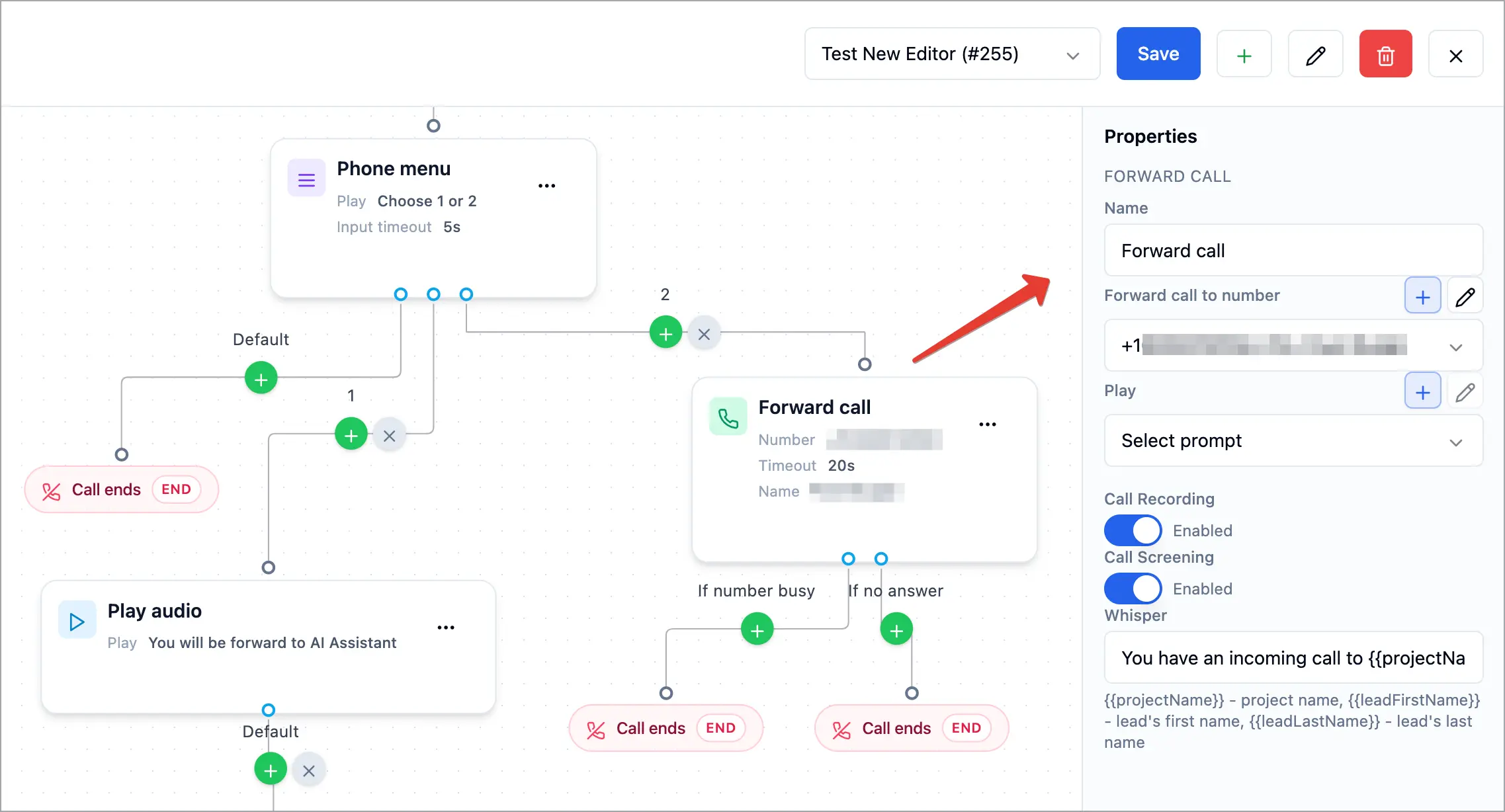
Forward call sends the caller to a single phone number — a teammate, your cell, or an external line. You can play a greeting first, record the call, screen it, and add a whisper that plays to the person answering. The block has two outputs: If number busy and If no answer, so you decide what happens when the call isn’t picked up.
Why use it
- Reach one specific person or line for a number or a menu option.
- Never drop a missed call — send busy and no-answer to voicemail or another teammate.
- Screen and prepare the person answering with call screening and a whisper.
Before you start
- Have the destination phone number ready (or add one with the + next to the field).
- Decide what happens on busy and no answer — voicemail, another block, or ending the call.
- New to wiring branches? See Connecting & Branching Calls.
Set it up
- Click the + on a connection and choose Forward call.
- Click the block to open Properties.
- In Forward call to number, pick the destination (or click + to add one).
- (Optional) Choose a greeting in Play, and turn on Call Recording.
- (Optional) Turn on Call Screening. When it’s on, a Whisper field appears — the short message played to the person answering, e.g. “You have an incoming call to {{projectName}} project.” You can use {{projectName}}, {{leadFirstName}}, and {{leadLastName}}.
- Connect If number busy and If no answer to the next block (often a Voicemail), or disconnect them to end the call.
- Click Save.
How it works
The call rings the chosen number. If the person answers, they’re connected (and, if you set one, they first hear the whisper). If the line is busy, the call follows If number busy; if no one picks up in time, it follows If no answer. Any output you leave disconnected ends the call.
Tips & best practices
- Always route busy and no-answer somewhere — voicemail is the usual choice — so callers aren’t dropped.
- Use call screening + whisper so the person answering knows which line the call is for before they say hello.
- Record important calls by turning on Call Recording.
FAQ
What’s the difference from Ring users?
Forward call rings one number; Ring users rings a whole group. Use Forward for a single line, Ring users for a team.
What is a whisper?
A short message played only to the person answering — not the caller — so they know which project or line the call is for. It appears when Call Screening is on.
Where do busy and no-answer calls go?
Wherever you connect If number busy and If no answer. Send them to a Voicemail block so nothing is missed.
Related articles
Still feeling stuck? Please send us your questions using this form.