In short: On the Files tab, drop files onto the page or click Upload files. You can add PDF, Word, PowerPoint, text and HTML files of up to 25 MB each, 10 at a time. Voizee reads the text and trains on it. Scanned documents without a text layer cannot be read.
What it is
The Files tab holds documents you already have — brochures, policy wordings, product guides, price sheets, procedures. Voizee extracts their text, so your AI agents can answer from them. The original file stays available for download.
Why use files
- Reuse what you have. No need to retype a 20-page guide.
- Keep the original. Your team can download the exact file from the knowledge base.
- Easy to update. Upload a new version with Replace file.
Before you start
- Create a knowledge base — see Create a Knowledge Base.
- You need to be an account admin or a call manager.
- Check that your files contain real text. If you can select and copy text in a PDF, Voizee can read it.
Upload files
- Open AI & Automation → Knowledge Base, click a knowledge base and open the Files tab.
- Drag files onto the drop area, or click Upload files and choose them. You can add up to 10 files at a time.
- Voizee shows the result: “Added N.” and, if some files were not accepted, a Not added list with the reason for each.
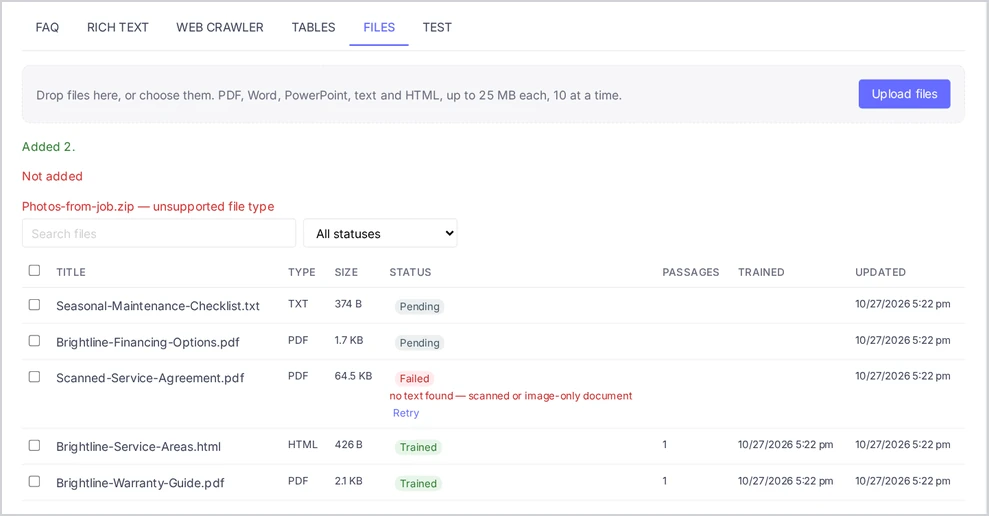
Accepted files appear in the list with their Type, Size and Status, and train like other sources.
Supported files
| Type | Extensions |
|---|---|
| Word | .doc, .docx |
| PowerPoint | .ppt, .pptx |
| Text | .txt, .md |
| Web page | .html |
Each file can be up to 25 MB. A knowledge base can hold up to 500 files.
Spreadsheets go to the Tables tab — see Add Price Lists and Catalogs as Tables.
Why was a file not added or not trained?
| Message | What it means | What to do |
|---|---|---|
| unsupported file type | The format is not in the list above | Save the file as PDF or DOCX, or copy the text into a document |
| already present as name | The exact same file is already in this knowledge base | Nothing — the file is there |
| The file is too large. The maximum is 25 MB. | The file is over 25 MB | Split it or remove images and save it again |
| no text found — scanned or image-only document | The file has pictures of pages, not text | Run it through text recognition (OCR) or use the original digital document |
| file is password-protected | Voizee cannot open it | Save a copy without a password and upload that |
| file is damaged or unreadable | The file cannot be opened | Open and save it again, then use Replace file |
The first three reasons appear right after the upload. The last three appear as a Failed status with the reason next to it.
Work with files
Click a file to open its details. There you can:
- Download — get the original file;
- Replace file — upload a new version in place of the old one;
- Delete — delete the file from the knowledge base. The original file is deleted too.
To delete several files, tick them in the list and click Delete selected.
Tips & best practices
- Prefer text over slides. A presentation with a few words per slide gives the AI little to work with. A written document on the same topic answers better.
- Remove outdated files. If a new brochure replaces an old one, use Replace file instead of uploading a second copy — otherwise the AI may find the old prices.
- Describe important images in words. Text inside pictures, charts and screenshots is not read.
- Name files clearly. “Home insurance — what’s covered.pdf” helps your team, and the name appears as the title of the source.
- Keep confidential files out of knowledge bases used by AI agents. AI agents can quote anything in the knowledge bases they search. See One Knowledge Base or Several?.
FAQ
Can Voizee read scanned PDFs? Only if the PDF has a text layer. A scan that is just a picture of the page shows “no text found — scanned or image-only document”.
How many files can I upload at once? Up to 10 at a time, each up to 25 MB. A knowledge base can hold up to 500 files.
Can I upload Excel files here? No. Upload spreadsheets on the Tables tab.
What happens when I replace a file? The new version takes the old one’s place, and Voizee trains on its text.
Can call agents download files? Yes. Call agents can open a file’s details and click Download. Replacing and deleting files needs an account admin or a call manager.
Related articles
- Write Documents in the Knowledge Base
- Add Price Lists and Catalogs as Tables
- Knowledge Base Statuses and How to Fix Problems
- Knowledge Base Limits and Supported Files
Still feeling stuck? Please send us your questions using this form.