In short: Open a knowledge base, go to the Test tab, type a question the way a customer would and click Test. Voizee shows the Answer an AI agent would give and the passages it found, each with a Relevance score. Testing changes nothing in the knowledge base.
What it is
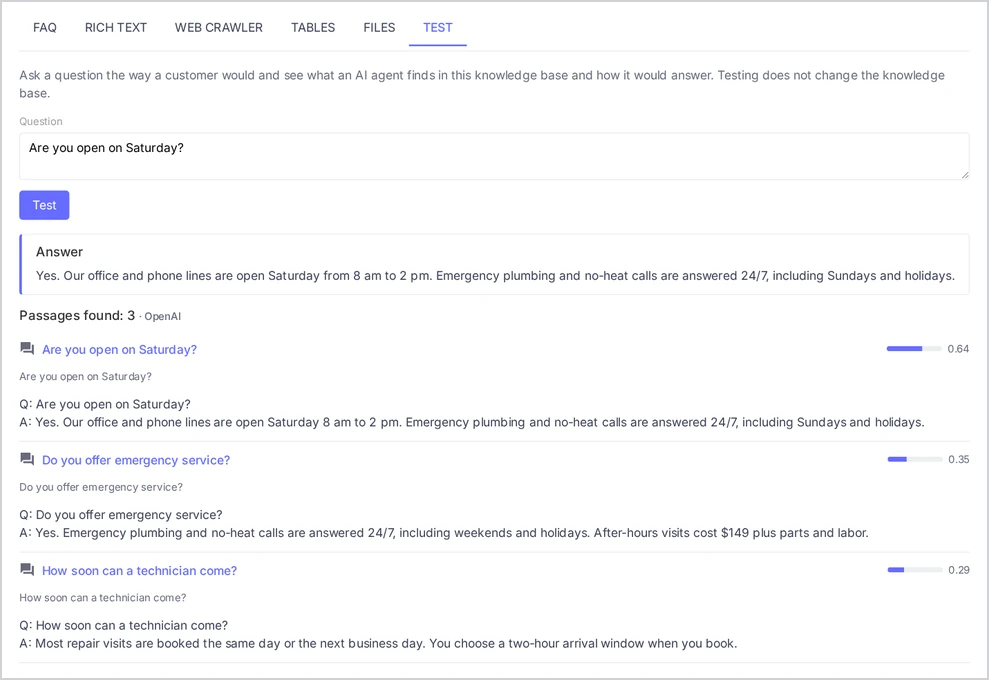
The Test tab is a safe place to check your knowledge base. You ask a question, and Voizee runs the same search your AI agents use. You see two things:
- Answer — the reply an AI agent would write from what it found;
- Passages found — the pieces of your content the search returned, best match first.
If the answer is wrong, the passages show why: the right content is missing, unclear or outranked by something else.
Why test
- Catch gaps before customers do. A question with no good passage needs new content.
- Check wording. See whether customers’ own words find your content.
- Confirm a fix. After you edit an FAQ, test the same question again.
Before you start
- The knowledge base needs trained sources. If nothing is trained yet, the tab says “This knowledge base is still being trained. Try again when its sources are trained.”
- To see the Answer, your account needs a connected AI provider for conversations. Without one, you still see the passages.
- Anyone who can open the knowledge base can test it, including call agents.
Test a question
- Open AI & Automation → Knowledge Base and click a knowledge base.
- Open the Test tab.
- Type a Question, for example “are you open on Sunday?”. Press Enter or click Test.
- Read the Answer.
- Look through Passages found. For each passage you see:
- the type of source and its title — click the title to open the web page or the source;
- the section heading it comes from, if any;
- a Relevance bar — the fuller it is, the closer the match;
- the start of the text, with Show more to read all of it.
If your AI agents run on more than one AI provider, a Search index picker appears. Choose the index to test — see Knowledge Base Statuses and How to Fix Problems.
Read the result
| What you see | What it usually means | What to do |
|---|---|---|
| A correct answer, the right passage on top | The knowledge base covers this question | Nothing |
| A wrong or vague answer, the right passage lower down | Other content looks similar | Make the right content more specific, or remove outdated duplicates |
| The right fact is missing from every passage | The knowledge base does not have it | Add an FAQ or a document with that fact |
| “No relevant knowledge found” | Nothing matches the question | Add content in the words customers use |
| An outdated price or policy | An old source is still trained | Update or delete the old source |
| A correct passage, but the answer leaves out a detail | The passage mixes several topics | Split it into separate FAQs or sections |
Messages you may see
- “The AI key for this index is disconnected.” The AI provider key used for this index was removed. An account admin can reconnect it under Settings → Organization → Integrations.
- “Connect a conversation AI key to see the answer an AI agent would give.” The search works, but no AI provider is set up to write answers.
- “The AI provider did not answer. Try again later.” Your AI provider did not respond. Try again in a few minutes.
Tips & best practices
- Ask like a customer. Use short, casual questions with typos and slang: “u guys open sat?”, “how much 4 a quote”.
- Ask each important question three ways. “What does it cost?”, “Pricing?”, “Is it expensive?”.
- Test questions you can’t answer. The right result is “No relevant knowledge found” — not a made-up answer.
- Keep a test list. Write down 20 key questions and run them after every big change.
- Check the passages, not only the answer. A good answer from the wrong passage can break after the next change.
FAQ
Is the Test answer exactly what my AI agent will say? It shows what an AI agent finds in this knowledge base and how it would answer. Your AI agent also follows its own instructions and conversation, so its wording can differ, but the facts come from the same passages.
Does testing cost anything? Each test uses your AI provider account, like a short AI agent reply.
Does testing change the knowledge base? No. Testing does not change the knowledge base.
Can I test several knowledge bases at once? The Test tab checks one knowledge base. To see what a live SMS or chat AI assistant found across several knowledge bases, use the Response Info button on its replies — see Connect a Knowledge Base to Your AI Agents for SMS, Chat and Voice.
Related articles
- Knowledge Base Statuses and How to Fix Problems
- How to Write Knowledge Your AI Agents Can Use
- Connect a Knowledge Base to Your AI Agents for SMS, Chat and Voice
- Keep Your Knowledge Base Current
Still feeling stuck? Please send us your questions using this form.