In short: Enrollment forms hold SSNs, bank accounts and health answers. Your team sees them masked, with only the last four digits. Only people an account admin names on the Reveal rights tab can open them in full, and every such view is written to the Access log. Health answers, signatures and files are stored encrypted, and emails to your agency never carry them.
What it is
The Insurance section collects data your customers trust you with:
| Data | Where it comes from | How it is protected |
|---|---|---|
| SSNs, driver’s license, bank account, health answers, signatures | The enrollment form, the employee enrollment form and the company payment form | Stored encrypted. Hidden on the lead card, where the SSN and bank account show only their last four digits. Shown in full only to people with the reveal right, and every view is logged |
| Health and income answers, household, doctors, prescriptions and the drawn signature | The intake form | Stored encrypted. Shown to the people who can open the customer’s lead |
| Doctors and prescriptions checked on a quote | The quote editor | Stored encrypted |
| ID cards, policy documents, files customers send | The lead card and the customer portal | Stored encrypted, never at a public address. Every download is logged |
This article is for account admins: you decide who sees what.
Why it matters
- Most of your team never needs a full SSN. Masking keeps it out of sight during everyday work: quoting, calls, follow-ups.
- You know who looked. The access log answers “who opened this enrollment?” with a name, a time and an IP address.
- Less data in inboxes. Notification emails carry names and links, not health or bank details.
Before you start
- The Insurance section must be turned on for your account. To turn it on, contact Voizee support.
- The Reveal rights and Access log tabs are visible to account admins only.
Who sees what
| Who | What they see |
|---|---|
| Everyone who can open the customer’s lead | The Insurance panel on the lead card: quotes, policies, files, intake answers, and enrollments masked (last four digits of the SSN and bank account, applicant names) |
| People with the reveal right | In addition: Show full details on each enrollment |
| Account admins | In addition: the Settings, Reveal rights and Access log tabs |
What a user can open follows your usual lead access. A call agent who cannot open a lead does not see its insurance data either, and cannot reveal its enrollments even with the reveal right.
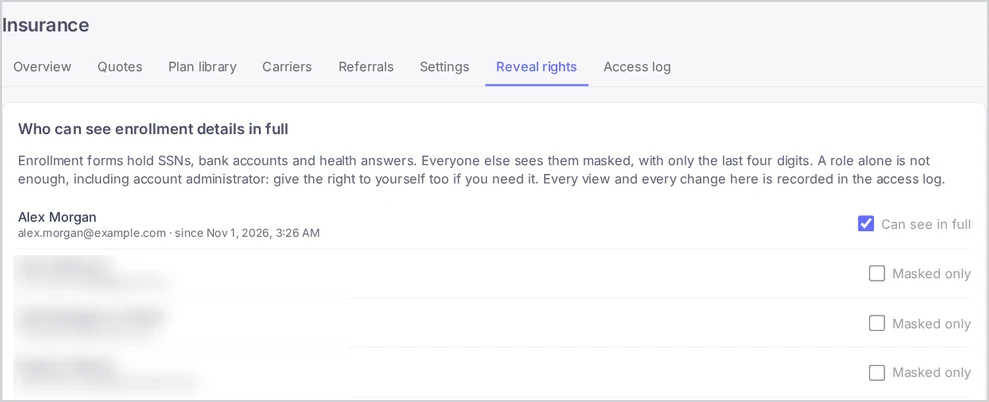
A role alone is not enough to see enrollments in full, including account admin. If you need the full details yourself, give the right to yourself too.
Give or take the reveal right
- Open Insurance → Reveal rights.
- Under Who can see enrollment details in full, find the user. Your own row is marked You.
- Turn the switch on. The row now says Can see in full, with the date since when.
- To take the right away, turn the switch off. The row says Masked only.
Each change is written to the access log as Right given or Right taken.
See an enrollment in full
- Open the customer’s lead card and find the Insurance panel.
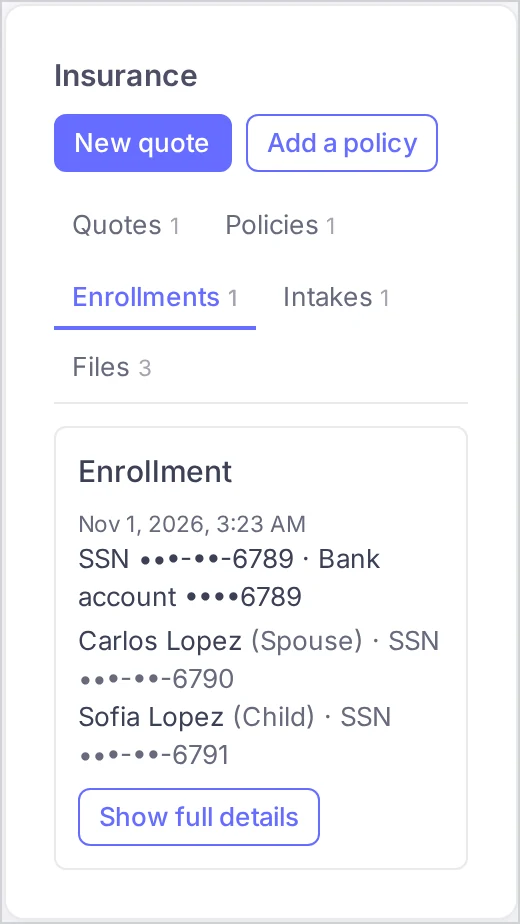
- Open the Enrollments tab. Each form shows its type (Enrollment, Employee enrollment or Company payment details), when it was sent, the masked SSN and bank account, and the applicants.
- Click Show full details. The Enrollment details window shows every answer of the form, the applicants, the authorization text the customer signed and their signature.
The window says: “This view was recorded in the access log.”
Without the right, the button is not there. Account admins see a hint with a link to the Reveal rights page. Other users see: “Numbers are masked. An account administrator can give you the right to see enrollments in full.”
When a customer sends the form again for the same quote, the earlier one is marked Replaced and stays on the lead.
Review the access log
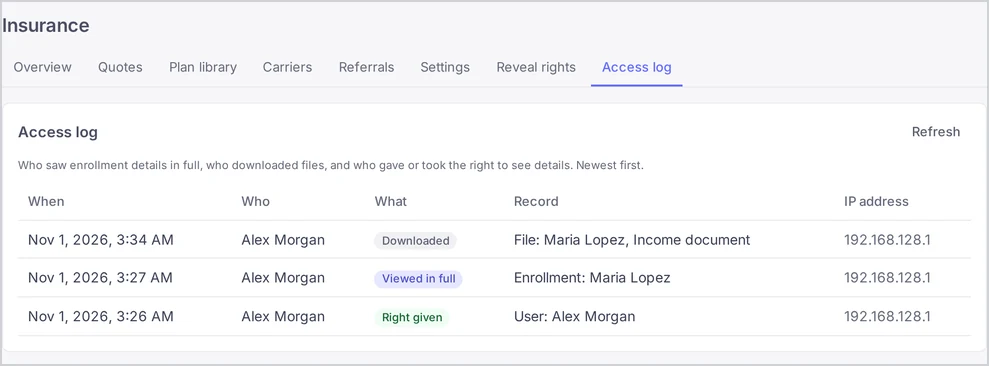
Open Insurance → Access log. It lists, newest first:
| Column | What it shows |
|---|---|
| When | Date and time, in your time zone |
| Who | The user, or Customer with their email for downloads from the customer portal |
| What | Viewed in full, Downloaded, Right given or Right taken |
| Record | The enrollment, the file or the user it concerns |
| IP address | Where the action came from |
The log shows 50 entries per page. Use Newer and Older to move between pages and Refresh to load the latest entries.
What emails carry
Notification emails to your agency are kept short on purpose:
- New quote request: the customer’s name, phone, email, location, who needs coverage, the desired start date and the preferred way to contact them, with a link to the request. Health, income, household and signature are not in the email.
- Enrollment received: the customer’s name and a link. The email says that it carries no SSN, bank or health details.
- Company payment details received: the person’s and company’s names. No bank details.
- Quote accepted: the customer’s name and the option they chose.
To read the details, your team signs in to Voizee and opens the lead.
HIPAA
Health insurance work often involves protected health information. The Insurance section helps you protect it:
- health answers, signatures, enrollment data and documents are stored encrypted;
- full enrollment details open only for the people you name, and every view and download is logged with the user and IP address;
- emails to your agency carry no health, SSN or bank details;
- customers sign in to their portal with a one-time code sent to their email, and see only the records of leads with their email address.
Your agency’s HIPAA obligations also depend on how you work: who has access to your account, which data you put into notes, messages and other parts of Voizee, and the agreements you have in place. If you have questions about HIPAA for your agency, contact Voizee support.
Tips & best practices
- Keep the reveal right to the people who submit applications. Most agents can quote and follow up with masked data.
- Review the access log every month. Look for views of enrollments outside a normal application process.
- Take the right away the day someone leaves or changes role.
- Keep health details out of lead notes, SMS and email. The protections above cover the Insurance forms, not free text your team types elsewhere.
- Ask customers to send documents through the portal, not by email or text. Portal files are stored encrypted and every download is logged.
FAQ
I am an account admin. Why can’t I see the full SSN? The right is personal. Open Reveal rights and turn it on for yourself.
Who can see the intake answers? Everyone who can open the customer’s lead, in the Intakes tab of the Insurance panel. Use your lead access settings to limit who can open which leads.
Is viewing the masked list logged? No. The log records full views, downloads and changes of the reveal right.
Are customers’ own downloads logged? Yes. Downloads from the customer portal appear as Customer with their email.
Can I export enrollment data? No. Enrollment details open one at a time on the lead card.
Related articles
- Insurance in Voizee: From Intake to Policy
- Enrollment After the Customer Accepts
- Collect Quote Requests with the Intake Form
- The Customer Portal: Your Customers’ Insurance Wallet
- Set Up the Insurance Section
Still feeling stuck? Please send us your questions using this form.